GridCue 2.2.0 is here, bringing a redesigned interface, session history, lap comparison and track layouts to your iRacing companion.
This update expands GridCue beyond overlays and race finding, giving you more useful information before you drive, during a session and after you return to the garage.
A redesigned workspace
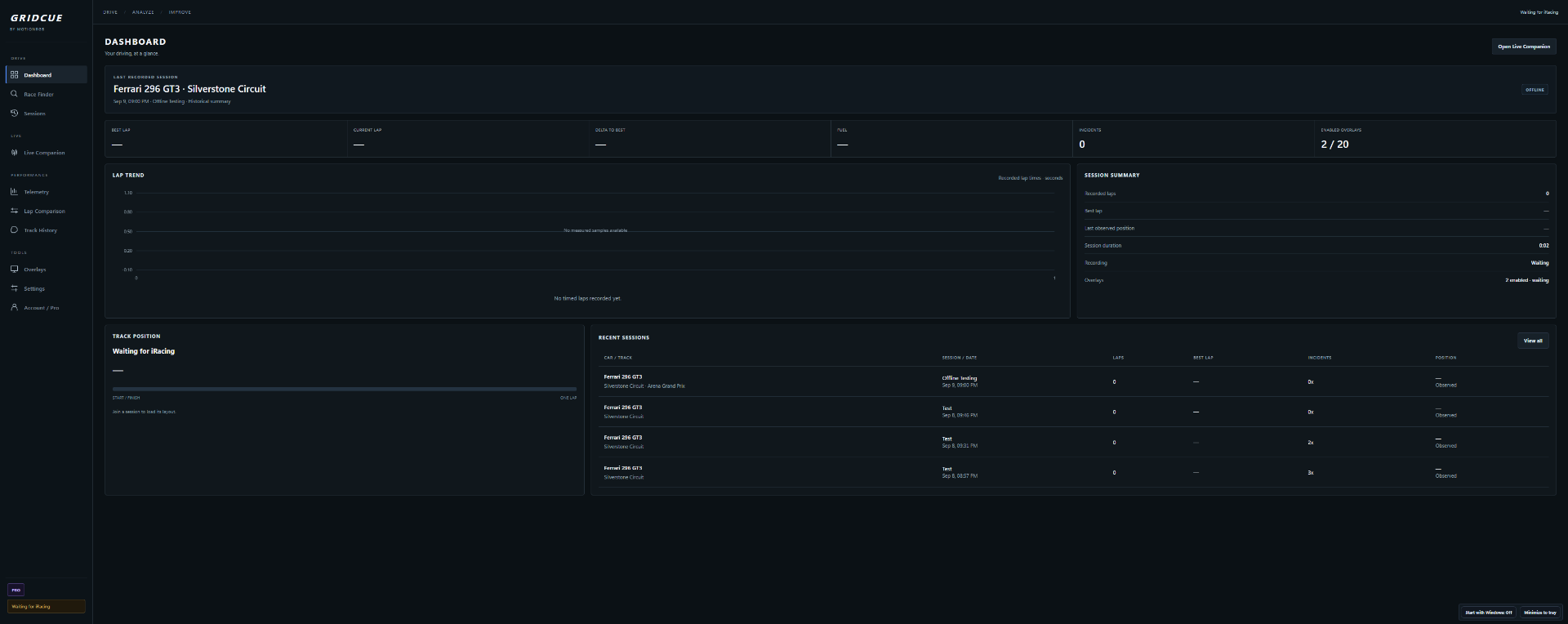
GridCue now has a more consistent desktop layout, with clearer navigation and dedicated pages for Dashboard, Live Companion, Sessions, Telemetry and Lap Comparison. The darker, more compact interface keeps important numbers easy to find.
The Dashboard brings together session information, lap times, fuel, incidents, lap trends and recent sessions in one place.
Review your driving
GridCue can now save session history and recorded lap traces, allowing you to return to previous sessions and compare your driving.
Lap Comparison displays speed, brake and throttle traces together, with a shared cursor and section zoom. Compare complete laps, inspect where time was gained or lost, and review measured differences in braking and throttle application.
Partial recordings are clearly identified, and missing telemetry stays unavailable rather than being replaced with estimated values.
Track layouts and improved race browsing
Official track layouts are now available for supported configurations, alongside measured lap progress.
Race Finder also gains improved browsing and filtering, with Recommended, All Races, By Series and By Track views. A detail panel brings schedule, car, track and owned-content information together.
Your existing overlays stay with you
The existing overlay collection remains available, including its customization controls. This release also corrects the G-force indicator’s forward and backward movement and improves replay labeling and recording checks.
Future updates, inside GridCue
Version 2.2.0 introduces in-app updates. When a newer release is available, GridCue can notify you and let you download and install it from the app. Installation is blocked while iRacing is running.
Get GridCue 2.2.0
If you already have GridCue installed, download the latest installer from the GridCue page on motionrgb.com and install this version once to enable future in-app updates.
After installation, open Settings → Diagnostics and check that your version is 2.2.0.
GridCue update / 2026-09-09
A New Look. More Ways to Improve. GridCue 2.2.0.